Showing posts with label tutorial. Show all posts

Sunday, November 26, 2017

TnT Tuts - #6,7 & 8 - Illustrating, Rigging & Animating a Cat in After Effects

In this tutorial series I tackle illustrating, rigging and animating a cat in After Effects.

The first thing people should know about rigging a cat versus rigging a human is that it's double the work (because it is double the legs). Also animal walk cycles are all just slightly different. Dogs vary from cats, cats vary from horses, and so on. So each animal rig is it's own unique beast so to speak. This is why it's always good to have lots of references. I have several books that reference various animal run cycles with photos and information. These are vital to understanding just how different animals walk, because if you don't understand the basics then there is no way you'll be able to deviate and add your own creative spin on things.

Another thing to note is that most animals require an extra bone by the shoulder or foot, so this adds to the complexity of your rig.

Finally, the other difficulty with animal rigs is that they often require extreme flexibility, especially in cats.  If you've ever seen a cat run you'll notice that their torso often stretches very wide on the jump and compresses very small on the landing.  This doesn't seem like a big deal but in terms of looking realistic, getting this to work is what will set your rig apart from others.  This flexibility can often be hard to pull off without breaking the rig as well.

In the following videos you'll see how I tackle these various challenges through the creative process.  I found this to be one of the most flexible cat rigs I've ever created and I had a lot of fun animating with it.


Monday, November 13, 2017

TnT Tuts - #5 - Animating a Bicycle in After Effects

This weeks tutorial features a character riding a bike.  You'll see how I use the same basic principles I've shown rigging characters with Duik, creating the bouncing ball, and using simple expressions to make this rig. 


Monday, November 6, 2017

Tnt Tuts - #4 - Bouncing Balls

So many exciting things to talk about for this one. Finally got a new microphone for the podcast, so now everything is looking and sounding professional. Everything except me that is. Now that I have all of the streaming logistics figured out, I'm happy I have the time to plan out my tutorials more. I want them to be off the cuff, but I also want them to be prepared enough so that people can actually learn something. In this tutorial it was more or less me just trying to work through something rather than explaining it very well. I will have to work on that for the future. Regardless, here is my tutorial on ball bouncing.


Thursday, November 2, 2017

Monday, October 30, 2017

Tnt Tuts - #2 - Character Animation in After Effects with Duik: Run Cycles

My second tutorial stream touches on making run cycles with Duik. You see a lot of walk cycles out there on the internet and I wanted to represent run cycles a little bit more. In a lot of ways they are more flexible and fun that run cycles. To catch my steams live just follow me on Twitch.


Wednesday, October 25, 2017

Tnt Tuts - #1 - Character Creation, Rigging, & Animation Feat. Overlord

I just finished my first Twitch stream and I hope to do more in the future.  For this first tutorial I decided to try out Battle Axe's new extension for After Effects called, Overlord.  Essentially this extension allows to to work more seamlessly between Illustrator and After Effects.  You can send your layers, text, and swatches back and forth from Illustrator and After Effects and all of your changes will update seamlessly.  To see how I created this nifty little vampire just watch the video below.


Thursday, August 10, 2017

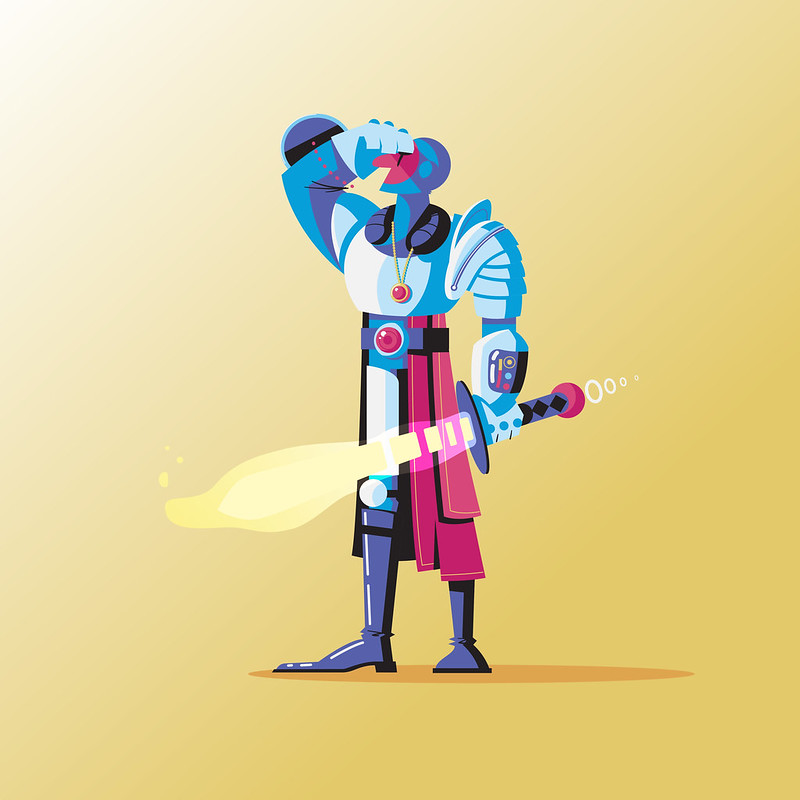
Day 225: Space Knight

I haven't done an in depth process video in quite a while, so I thought it would be fun to do a little timelapse of Day 225: Space Knight.

As usual, this one started with a simple sketch.  I had like 6 different ideas going into this sketch and was struggling bringing them all together. Basically I wanted to take the idea of a knight and bring it into the future.  I feel like knight armor and space suits share some similar attributes. That and I'm a sucker for both space and knights.


After the sketch was scanned in I brought the art into illustrator and just went at it.  Not a whole lot to say about it.  I am enjoying getting back into illustrator lately. I've been playing in Photoshop so much that it's a nice break to just play with vector shapes.  That and I'm much quicker in Illustrator so it's a little less stressful for me.


I was pleasently surprised with how it turned out given that I was struggling so much with the initial design. Just shows that sometimes you have to keep working at something even if you're unsure how it will turn out.

Day 225: Space Knight

Sunday, December 11, 2016

Photoshop Animation: A New Journey

It's been quite a while since I've posted on this blog. My Instagram feed on the side is always updating, you can always follow me there for quick hits. Also my Illustration and Photography page auto update when I add to my Flickr, so there is always new work to be seen.  Still, my day to day blogging has been lacking as of late.  Like most blogs it comes in waves. I commend anyone who can blog every day all day. It really becomes like a second job when you do that. Plus, I've been quite busy freelancing as of late, and most of that stuff I'm not aloud to just openly share my process on. However, I have been dabbling more into some personal things and it's time I got off my lazy ass and posted more.

Recently I've been trying to develop a new skill-set in Photoshop animation. I've always thought the Timeline option in Photoshop was really cool, but I've always been weary to dive into it. Doing frame by frame animation takes a lot more patience and time to get to that final product. I've grown pretty quick in my abilities to use Illustrator and After Effects to animate, so that excuse wasn't cutting it anymore. The bottom line is, if I want to make this part of my process, I need to practice to get quick at it. Just like I did with Illustrator. I've approached this in 2 forms so far: Pixel and Hand Drawn. 

Pixel

As an avid gamer this only felt like an obvious first step into the ream of the Photoshop Timeline.  For one, making pixel art in Photoshop is quite easy in principle.  You make a tiny canvas (300x300px), and then you color in each pixel until you make something cool.  The process of making a still image is actually quite fun because there isn't much you can do to totally ruin anything.  I started by making a couple character images. One of a favorite video game character of mine, ICO.  The other was a self portrait of myself with my cat.


This much was fairly easy, but I wanted to take it the next step.  So, I began working with my character to try and make a jump animation.  It seems simple enough to start, but when you have to begin bending pixel legs and making 12 or so copies, it gets a little more daunting.  To save some time, instead of drawing the character from scratch each and every time, I would copy and paste bits that didn't change much.  For instance, the torso remains fairly straight for a majority of the animation. Also the head stays the same almost throughout.  Doing this saved me lots of time while only having to focus on arms and legs and any other secondary motion such as the shirt and hair. 20-so frames later I had the jump that I was happy with.


I forgot to mention that I created the animation in a 30fps timeline.  I tried looking up the standard but couldn't really find one.  I wasn't going for the completely old school look, and I know that most modern games today run somewhere between 30fps and 60fps, so I just went with 30.  I also wanted it to look really smooth so I thought this would be better than a typical low animation frame rate. Below is the result in motion.

As you can see those 20 frames zip right by, and about 5 of them are just the hair bounce at the end. But that secondary motion of hair, the shirt, the smoke puff, all really add to the effect of the motion.

Hand Drawn

Now that I had my feet wet in the Photoshop Timeline, I felt I was ready to explore some more hand drawn type animations.  Once again, I thought it best to start off with something I was familiar with.  About a year ago I had sketched a character in my notebook.


I had always really loved this guy and planned to do some animation with him, but just never got around to it.  Creating him in Illustrator just felt like I was cheapening his look.  He was meant to have a hand drawn feel to him.  So, with the same principles in mind from the Pixel animation, I began drawing this guy.  However, starting out was much different.  I had to make a stick figure rendition first to make sure the timing was right.

Once I had this locked down I could begin my shortened process as before.  I made a sketch of the character first. Then, instead of drawing him new everytime, I simply copied and pasted him and used the lasso tool to rotate the limbs and such.  This was the result:

As you can see,  there are some breaks in the lines near his arm. This was the result of me using the lasso tool and moving bits around.  However, it worked to speed up the process. Now I could go through and draw over everything very nicely without worrying about timing or placement.  I did that, and added some color to get the final image:
This process really taught me a lot, and I took it to the next level on my next project. Someone had reached out to me on Instagram asking if I could animate their character removing a sword from a stone, like in Zelda. Being a huge fan of that entire sentence I couldn't possible refuse. So, I began by going through the same set of steps to achieve the animation:
From there I decided to take it a step further. I brought the character and background into After Effects separately so I could do further compositing on the animation as well as give it some slight camera motion. After tweaking the colors, adding some flares and dust, I was pretty pleased with the final result:
I have to say all in all this has been a really fun endeavor and a nice break from business as usual. While I still love making characters in Illustrator, using Duik to rig and animating in After Effects, it's still nice to hone a new skill. That's it for now. I will hopefully be blogging a little more often now. Probably not every day, but at least more than once every 6 months. Also I created a Facebook page specifically for my blog and art. So if you want to support me go over there and like the page. Otherwise check out all my social links on the right side of my blog. You can follow me just about anywhere.

Thursday, November 5, 2015

New Walk Cycles with Duik 15

Yes it's been months since I've updated this ol' thing, but I haven't forgotten about it. I've just been doing a lot of freelance work and not a lot else recently. However, Duik just recently released they update to Duik 15 and it has a lot of awesome new features. The one I was most excited about was the ability to finally rig and animate 4 legged animals. Below are some walk cycles I've done so far with it. The dog isn't perfect but for a first trial I definitely learned a lot.


Tuesday, May 26, 2015

After Effects "2D/3D" Head Turn Rig Tutorial Follow Up - Run and Walk Cycles

So in the post prior to this one I shared a little tutorial I made about created a "2D/3D" character head turn in After Effects.  I played around a little more to see how this would fit into my full body character rig workflow and I was pretty pleased with the results. I even took it a step farther and made a torso turn that was parented to the head turn.  At the end of the day it may not seem like a huge difference, but being able to freely turn a characters head back and forth is a new achievement for me and really opens a lot more doors when it comes to what's possible with some light character animation in After Effects. No tutorial this time, but enjoy a few .gifs of the results.


Monday, May 25, 2015

After Effects "2D/3D" Head Turn Rig Tutorial


Recently I've been wanting to push my animated characters to the next level, and for me that means turning heads. It's the obvious next step in the progression of making your characters that much more dynamic and believable. I've seen many artists rigs and animations with this sort of idea implemented, but I have a tough time finding solid tutorials or guides into how to truly make this rig. However, I did find this video from Ross Plaskow on simply making a 2D head turn.


This is an amazing tutorial to get started and I definitely suggest you watch it before mine; however, this video stopped just 1 step short of where I wanted to actually get to. I wanted to see how to actually take that head turn and then implement it into a full body character rig like one might make using Duik. After some experimenting and fumbling around I ended up creating the tutorial below. It's not the most in depth thing you'll watch all day, but hopefully it unlocks just enough inspiration for you to take this and use it in your own rigs moving forward. Hope you enjoy.

Monday, September 29, 2014

Cutting Room Floor Update #2 - Getting back into it

Alright I'm back, and a little later than I had anticipated. I got sick so that knocked me out for about a week and I also had a freelance animation that I was working on at the same time. Those are both done and out of my system now and I'm back to full time working on Cutting Room Floor (aside from my day job that is, still gotta pay for the cat litter.) Anyways, I'm still in asset and background creation mode. Below you can check out a timelapse video of me creating and rigging Professor Hoodlebrink and also a still image of the Bun House Mobile interior shot. Much more to come in the following weeks as I still plan to finish this by Halloween.


Tuesday, September 9, 2014

Cutting Room Floor Update #1

For those that don't know I am undertaking a much lengthier animation in my MeanMug & Slim style in the vein of old Scooby Doo cartoons. I've completed the script and audio recordings and I'm estimating the final piece coming out to around 15 minutes, which is a great length for an animated short. However, that's a lot of work and planning for just lil' ol' me. Probably in over my head actually...but I figured it would be entertaining and possibly educational to show you bits and pieces along the way. Seeing as how I have my script all read and a general storyboard, the next thing to do was to get my characters into After Effects, rig them up with Duik, and test them out. Below are some fun results I've had playing with my newly rigger character. Stay tuned for more updates!


And here is a bonus shot of D-Man with a giant bong, just because.


Tuesday, August 19, 2014

After Effects Lip Sync Problem

Been having this issue with lip syncing in After Effects so I thought I would make a video about it. If I turn up an answer I will be sure to follow up with another video.

Wednesday, January 29, 2014

Cube Spin Test

Recently a coworker approached me with two videos he had seen online (https://vimeo.com/13458659, https://vimeo.com/7576197) and wanted to know if it was possible to recreate the cube spin seen in them without using Cinema 4D or any sort of 3D program. So in an afternoon I whipped up something similar completely within After Effects and you can see the result below. It was made with a few lights, a 3D cube made from 2D shape layers, and some faux shadows.

Tuesday, December 3, 2013

Life of Slim - Behind the Scenes: Creating The Bar

As promised, a timelapse of me creating one of the backgrounds I'll be using for the next animation. Really like how this one turned out actually.


Thursday, November 14, 2013

Cowboy Painting Timelapse

Trevor Conrad has taken the time to make this wonderful timelapse of a cowboy character he created from scratch in Photoshop. While the timelapse is long, it gives you the time to really inspect his process and learn a thing or two. I always love watching other people work, and you should too.

Monday, November 11, 2013

Photoshop Animation Tutorial

Do you like the animations of Charles Huettner and Caleb Wood of Late Night Work Club? Have you ever wanted to learn to animate in Photoshop? Well if you answered yes to either of these questions then I think the below video would be worth your viewing time. Charles and Caleb do a short tutorial on animating two different ways in Photoshop; frame view and timeline view.

Tuesday, October 29, 2013

Root Portrait

At the company I work, Root Inc., the artists will create unique and original portraits for each and every hire. Recently I signed up to do one and I thought the result came out pretty well, so I figured I could do a brief step by step of the process.

It all starts out with a picture and a few ideas from the person you are creating. Stephanie, the girl who's portrait I created, told me she had a dog named Frank and loved to bake.


So with my photo of Stephanie and Frank I started to do a quick sketch. Damn this looks fucking sweet!


I then took my sketch and references in Adobe Illustrator and started to define it. With the help of some movie magic we can see the final immediately! Check it out below.